
Want to step into the exciting world of online gaming? Creating your BHT Club Account is fast, easy, and secure—giving you instant access to exclusive features, rewards, and smooth gameplay. With a simple sign-up process, strong security measures, and special bonuses for new users, getting started has never been easier.
Sign Up for BHT Club
Opening an account on BHT Club takes only a few minutes. Once registered, you’ll unlock exciting features, enjoy secure gameplay, and gain access to exclusive promotions. Follow the steps below and begin earning rewards right away.
Why Join BHT Club?
Track Your Activity: Review your full game history along with detailed performance insights.
Welcome Rewards: Enjoy special bonuses and promotions available only to registered members.
Secure Transactions: Deposit and withdraw funds with bank-grade security.
Enhanced Protection: Enable real-time alerts and Two-Factor Authentication (2FA) for added account safety.
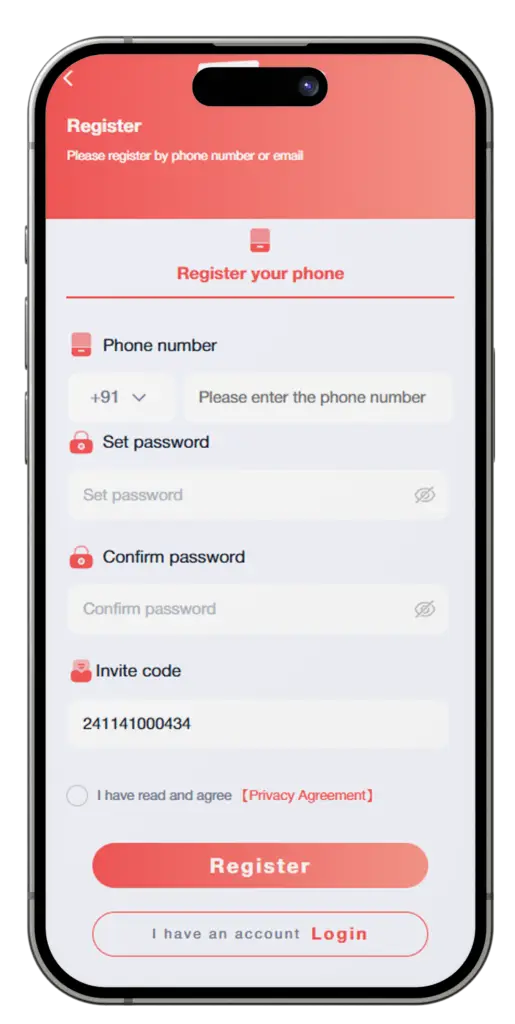
How to Register on BHT Club
Creating your account is quick and straightforward. Follow these steps to complete registration safely:
Step 1: Visit the Registration Page
Open your browser and go to bharatclub.info/register, or
Click the Register button in the top-right corner of the website.
Step 2: Enter Your Details
Fill in the registration form with the following information:
Mobile Number or Email Address
If using a phone number, enter it in Indian format (+91XXXXXXXXXX).
Example: +91 9876543210
You may also register using a valid email address.
Create a Password
Choose a strong password with at least 8 characters.
Include both letters and numbers for better security.
Example: Game1234 or PlayNow89
Referral Code (Optional but Recommended)
Enter a referral code (if available) to receive bonus credits after registration.
Step 3: Accept Terms & Policies
Tick the checkbox to confirm that you agree to the Terms & Conditions and Privacy Policy.
Reviewing these documents helps you understand your rights and responsibilities.
Step 4: Secure Your Account
After registration:
Go to Account > Settings in your dashboard.
Verify your identity if requested.
Enable Two-Factor Authentication (2FA) to add an extra layer of protection.
BHT Club Account Troubleshooting
Email or Phone Number Already in Use
If you receive this message:
Try logging in using your existing credentials.
Use Forgot Password if you can’t remember your password.
Contact customer support if you still can’t access your account.
Referral Code Problems
Make sure the code is entered exactly as provided (case-sensitive).
If the code doesn’t work, leave the field blank—you can add or update it later under Referrals.
Verification Email or SMS Not Received
Check your Spam/Junk folder.
Click Resend Code on the registration page.
Confirm your email address or phone number is correct.
Ensure your internet connection is stable.
Frequently Asked Questions
Can I use my account on multiple devices?
Yes. BHT Club supports cross-device access. You can log in using the same account on:
Desktop or laptop
Mobile phone
Tablet
For security, always log out from devices you no longer use.
How is my information kept safe?
Your data security is a top priority. BHT Club uses:
SSL encryption to protect data transmission
Secure authentication to prevent unauthorized access
Two-Factor Authentication (2FA) for additional account protection
Get Started Today
Once registration is complete, you’re ready to:
Play live colour-prediction games anytime
Unlock exclusive bonuses and rewards
Enjoy a smooth and secure gaming experience across all devices
Follow the steps above, resolve any sign-up issues easily, and jump straight into the action with confidence.